---
title: How To Set Up an Apple Developer Account
description: This article will walk you through how to create an Apple developer account
---
[Skip to content](https://app.encappturehomecare.com/knowledge/how-to-set-up-an-apple-developer-account-1#main-content)
English
Show submenu for translations
![EnCappture-Logo2-03-2.png\]](https://app.encappturehomecare.com/hs-fs/hubfs/EnCappture-Logo2-03-2.png?height=40&name=EnCappture-Logo2-03-2.png)
Open main navigation
Close main navigation
- English
Show submenu for translations
- Go to encappture.com
Go to encappture.com
Hello. How can we help you?
- There are no suggestions because the search field is empty.
1. [Help Center](https://app.encappturehomecare.com/knowledge?hsLang=en)
2. [NEW DASHBOARD ~ enCappture Mobile App Platform](https://app.encappturehomecare.com/knowledge/new-dashboard-encappture-mobile-app-platform?hsLang=en)
3. [Developer Accounts](https://app.encappturehomecare.com/knowledge/new-dashboard-encappture-mobile-app-platform?hsLang=en#developer-accounts)
# How To Set Up an Apple Developer Account
## This article will walk you through how to create an Apple developer account
Creating a developer account differs from setting up your Apple ID. Don’t worry, though! In this article, we’ll walk you through a simple, step-by-step guide to help you create your Apple developer account with ease. Just a quick heads-up: you’ll need an Apple ID before you can start. If you haven’t created one yet, no problem! We recommend checking out this [helpful article](https://app.encappturehomecare.com/knowledge/how-to-set-up-an-apple-id-for-your-business?hsLang=en)to guide you through the process.**To Start Your Enrollment in the Apple Developer program, click** this (**[https://developer.apple.com/programs/enroll/](https://developer.apple.com/programs/enroll/)**)
**The video below covers the whole process, so you can watch for step-by-step guidance.**
### **⚠️ Have the following ready to create the account⚠️**
1. iCloud account (This is your Apple ID)
2. Apple device (with two-step authentication set-up)
This could be an iPhone, iPad, or Mac computer.
3. Domain/Business Website
Your organization’s website must be publicly available and the domain name must be associated with your organization.
4. Domain/Business Email
5. D-U-N-S Number
Your organization must have a D-U-N-S Number so that we can verify your organization’s identity and legal entity status. These unique nine-digit numbers are assigned by Dun & Bradstreet and are widely used as standard business identifiers. You can check to see if your organization already has a D-U-N-S Number and request one if necessary. They are free in most jurisdictions. [Learn more](https://developer.apple.com/support/D-U-N-S/)
### If you have any problems and need to contact Apple-
1. Check out the [HELP Article](https://app.encappturehomecare.com/knowledge/how-to-contact-apple-developer-support?hsLang=en) on how to contact them.
2. Feel free to contact [EvelyneGibson@enCappture.com](mailto:EvelyneGibson@enCappture.com) or [Support@enCappture.com](mailto:Support@enCappture.com) to book a call, and we can walk you through this in person.
### 🎯NEXT STEPS🎯
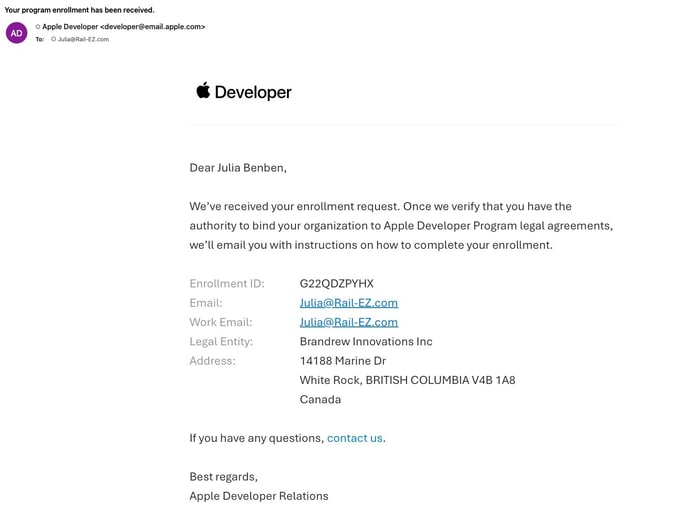
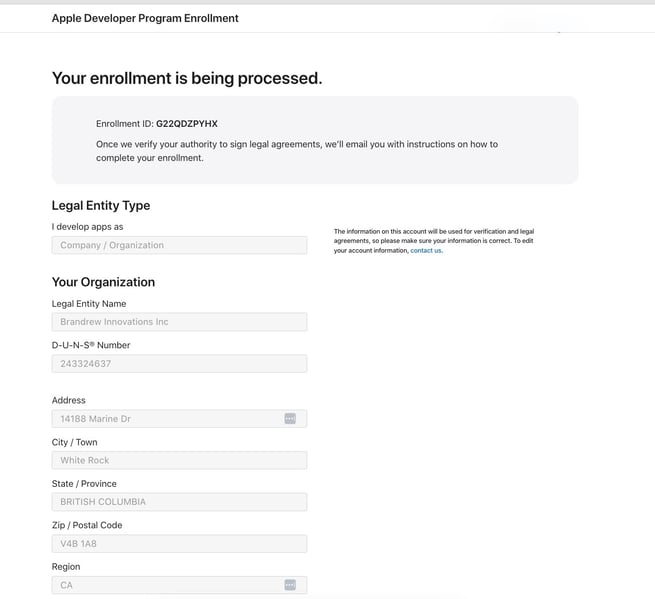
Apple will send you an email with a Verification code that looks like this
---
### **NEXT STEP**
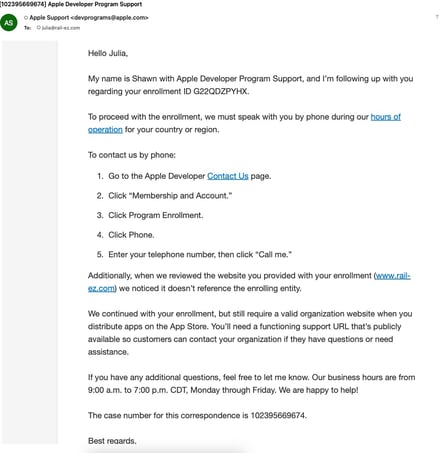
You will then hear back from them in 5 business days to proceed with Step 2 "Completing enrollment." **This is done via PHONE CALL** You will get an email that looks like the below (or similar)
### 
### Follow the steps below to get contact Apple Support to complete Verification.
- Log into your Apple Developer Account (make sure to use the email you used to create the account) [https://developer.apple.com/account](https://developer.apple.com/account)
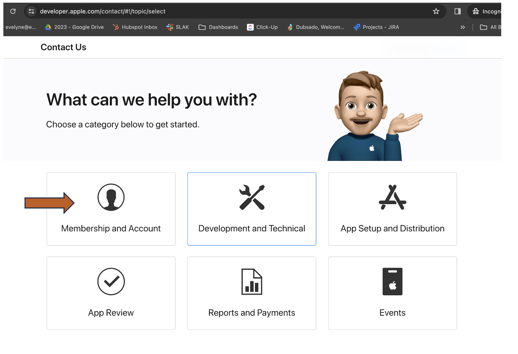
- Scroll to the bottom of the page and look for "SUPPORT" - "Contact Us"
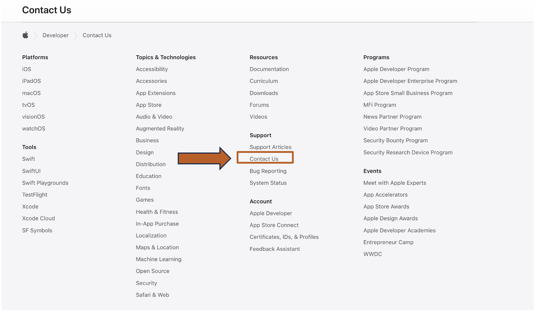
\=**\> Choose Membership & Account**
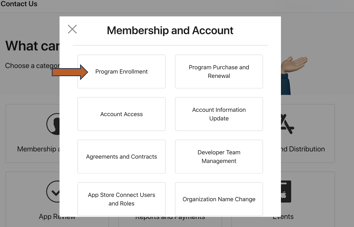
**=\> Choose Program Enrollment**
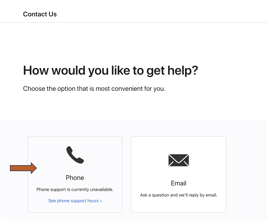
**=\> Choose Phone Call • Please note that Apple's hours are 9am-7pm CST • When you set up the call, they will call you immediately.**
---
### **NEXT STEP**
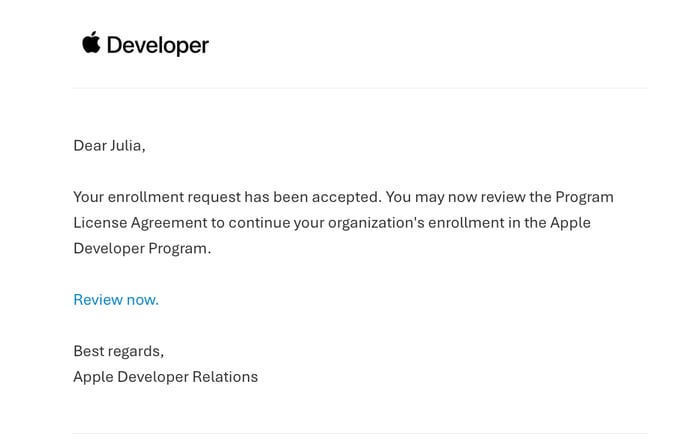
After your verification call, you will get an email like the one below. This video walks you through the final process of setting up your developer account
1\) Accepting the terms and conditions
2\) Paying the annual fee
- [NEW DASHBOARD ~ enCappture Mobile App Platform](https://app.encappturehomecare.com/knowledge/new-dashboard-encappture-mobile-app-platform?hsLang=en#main-content)
- [The Basics](https://app.encappturehomecare.com/knowledge/new-dashboard-encappture-mobile-app-platform?hsLang=en#the-basics)
- [Onboarding New Users](https://app.encappturehomecare.com/knowledge/new-dashboard-encappture-mobile-app-platform?hsLang=en#onboarding-new-users)
- [User Management](https://app.encappturehomecare.com/knowledge/new-dashboard-encappture-mobile-app-platform?hsLang=en#user-management)
- [Forms, Surveys and Polls](https://app.encappturehomecare.com/knowledge/new-dashboard-encappture-mobile-app-platform?hsLang=en#forms-surveys-and-polls)
- [The Communications Hub](https://app.encappturehomecare.com/knowledge/new-dashboard-encappture-mobile-app-platform?hsLang=en#the-communications-hub)
- [Resources](https://app.encappturehomecare.com/knowledge/new-dashboard-encappture-mobile-app-platform?hsLang=en#resources)
- [Developer Accounts](https://app.encappturehomecare.com/knowledge/new-dashboard-encappture-mobile-app-platform?hsLang=en#developer-accounts)
# enCappture
encappture.com Help Center
Copyright © 2026, enCappture
```json
{
"@context" : "https://schema.org",
"@type" : "VideoObject",
"caption" : {
"@type" : "MediaObject",
"contentUrl" : "https://app.encappturehomecare.com/media-transcripts/178412605095/en.vtt",
"inLanguage" : "en",
"name" : "en Captions"
},
"contentUrl" : "https://23543266.fs1.hubspotusercontent-na1.net/hubfs/23543266/Apple%20ID%201b.mp4",
"dateModified" : "2026-07-21T22:03:52.786Z",
"duration" : "PT4M22.873S",
"height" : 1426,
"name" : "Apple ID 1b",
"thumbnailUrl" : "https://23543266.fs1.hubspotusercontent-na1.net/hubfs/23543266/Apple%20ID%201b.mp4/medium.jpg",
"uploadDate" : "2024-09-13T22:46:35.522Z",
"width" : 3024
}
```